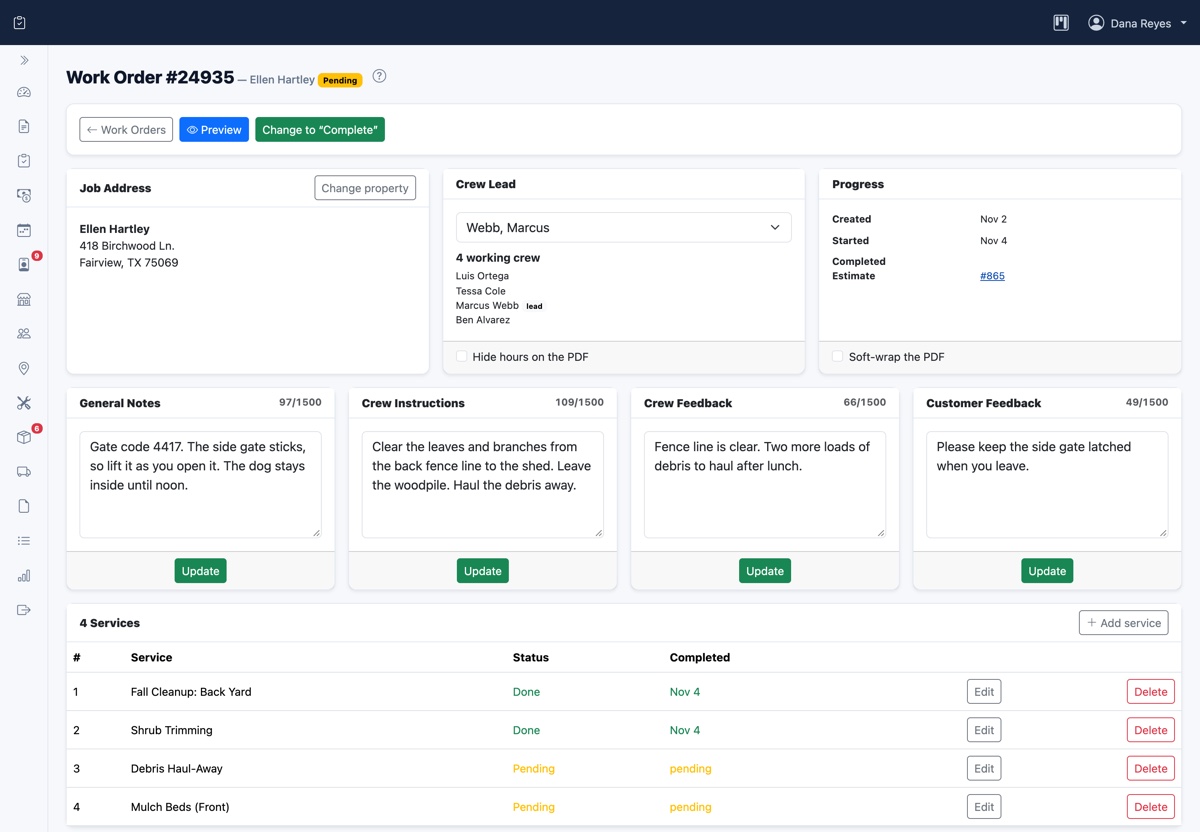
A field service work order is the document that tells a crew what to do, where to do it and what the customer was promised. It also records what actually happened on site. When a work order is complete, the crew rarely needs to call the office, and the invoice nearly writes itself. When it's vague, the same job can cost you a return trip, a billing argument or the revenue itself.
This guide covers what to put on a work order, how to move one from booked to billed, and how to handle changes once the crew is on site. It all applies whether your work orders live on paper, in a spreadsheet or in software.
What is a field service work order?
A work order is the instruction for a specific job. It's easy to confuse with the documents on either side of it, so it helps to see the three together.
- The estimate comes first. It tells the customer what you propose to do and what it will cost.
- The work order comes next. It tells your crew what was agreed and captures what they did.
- The invoice comes last. It tells the customer what they owe for the finished work.
Those audiences are different, and so is the content. A customer doesn't need the gate code on an estimate, and a crew may not need your pricing on a work order. Decide what each person needs to see before you build your template.
What to include on a work order
Your trade will add its own details, but most service jobs need the same core information. If a field regularly causes a phone call when it's missing, it belongs on the template.
The job and the customer
- A unique work order number
- The customer's name, phone number and email
- A link back to the estimate or request that started the job
- The date and the arrival window, plus the expected length of the job
The site
- The service address, which may not be the billing address
- Gate codes, lockbox codes and any access instructions
- Site notes, such as pets, parking or where to find the shutoff
- Past work at that address, if it's useful to the crew
Keep these details attached to the property rather than retyping them on each job. Customer property records carry them forward to every visit, so the gate code a crew needed last spring is still there this fall.
The work
- Each service to perform, listed separately
- Crew instructions, written for someone who has never seen the site
- The materials, parts and equipment the job needs
- The crew lead responsible for the job
What happened
This part gets filled in on site, and it's the part most often skipped. Leave room for:
- Start and finish times, including who worked
- Materials actually used, as opposed to materials planned
- A status for each service, so "done" and "couldn't finish" aren't confused
- Before and after photos
- Notes from the crew, and the customer's sign-off if you collect one
Write crew instructions that can't be misread
Instructions usually make sense to the person writing them, because that person already knows the job. Write for a crew member who wasn't in the conversation. Compare these two:
- Vague: "Clean up the back area like last time."
- Clear: "Clear the leaves and branches from the back fence line to the shed. Leave the woodpile. Haul the debris away and don't use the customer's bins."
A good test is to ask whether a new hire could finish the job without calling anyone. Say what's out of scope, too. A note like "leave the woodpile" takes a few seconds to write and can prevent an awkward callback.
The work order process, from booked to billed
Work orders stall in the gaps between people. A short, consistent set of stages shows you where each one is and who has to act next.
- Created. The job is approved. Copy the scope from the estimate rather than retyping it, so nothing gets lost.
- Scheduled. The job has a date, a crew lead and a place in the day's order. Our guide to field service scheduling and dispatch covers how to build that day.
- In progress. The crew has started, and the clock is running on the job.
- Completed. The crew has recorded its time, materials, photos and notes, and the office reviews anything unusual.
- Invoiced. The finished work has become a bill, and the work order is closed.
Add a stage only if someone would act on it. A "waiting on parts" status is useful when someone orders the parts and rebooks the job. Otherwise, it's just a place for jobs to sit.
Handling changes on site
Crews often find something the estimate didn't anticipate. The risk is that extra work gets done on a friendly verbal okay, then turns into a dispute when the bill arrives. Set a simple rule for your crews:
- Stop before starting the extra work.
- Tell the customer what you found, and take a photo of it.
- Get the added scope and price approved in writing, even if that's a reply to a text message.
- Add the approved work to the work order so it reaches the invoice.
Decide in advance who can approve what. A crew lead might handle small additions, while anything larger goes to the office for a formal change order. Some states also set written-contract rules for certain work, such as home improvement jobs, so check what applies to you.
Turn finished work orders into invoices
The payoff for a complete work order comes at billing. If the hours, materials and approved changes are already recorded, the office shouldn't have to chase anyone to write the invoice. Try to invoice soon after the work is finished, while the job is fresh in the customer's mind.
Make the check for unbilled work a routine as well. Once a week, list every completed work order without an invoice. An unbilled work report does this automatically, but a filter on a spreadsheet works for a small operation.
Keep your records
Work orders also explain your paperwork later on. The IRS says that supporting documents such as invoices and receipts back up the entries in your books and on your tax return. It doesn't name work orders, but keeping them with the matching invoice shows what each charge was for. They're also useful if a customer questions the work months afterward.
How long to keep records depends on the situation. The IRS lists three years as the usual period, with longer ones in some cases, including at least four years for employment tax records. It also notes that insurers or creditors may want records kept longer, so confirm the details with your accountant.
Common work order mistakes
- Leaving the real instructions in a text thread. If the details aren't on the work order, the next person to touch the job won't see them.
- Filling in the time afterward. Hours written from memory at the end of the week are guesses. Record them as the work happens.
- Skipping the photos. A picture of the finished work can settle a question that would otherwise become your word against the customer's.
- Forgetting used materials. A part that never makes it onto the work order never makes it onto the invoice, and your stock count ends up wrong as well.
- Closing a job that isn't finished. If one service couldn't be completed, mark it and say why. Otherwise, nobody knows to come back.
Paper, spreadsheet or software?
Paper work orders can serve one crew well, as long as they get back to the office the same day. A shared spreadsheet makes it easier to see what's open. Both start to struggle when you notice these signs:
- Paperwork arrives days late, or it gets lost or damaged in the truck.
- The office retypes the same details into the estimate, the work order and the invoice.
- You can't tell which jobs are open without calling the crew.
- Customers ask for proof of the work, and finding it takes real effort.
Software helps most when a single job record runs from the signed estimate to the final invoice, and the crew can update it from a phone. See how CommandForce handles work orders, or start free.
Frequently asked questions
What should a field service work order include?
At a minimum, include the customer and service address, access details, the date and arrival window, each service to perform, crew instructions and the materials needed. Leave room to record the time worked, materials used, photos and notes from the crew.
What is the difference between a work order and an invoice?
A work order is an instruction to your crew that says what to do and records what was done. An invoice is a bill to your customer that says what they owe for the finished work.
How long should I keep work orders?
The IRS does not set a period for work orders by name. It lists three years as the usual period for records that support a tax return, with longer periods in some situations. Insurers or creditors may also want records kept longer, so confirm with your accountant.